
Miradore offers various options for distributing private apps to end devices, regardless of whether they are web apps, native iOS or Android applications. In this article, we have listed the best way for you to distribute these applications.
This is also of interest to companies that offer their customers individual applications. We also offer a special partner option for this.
Individual apps
Webapps
Many organizations use pure web applications. These can be easily distributed via MDM and provide employees and customers with quick access to these resources.
Examples:
- Time recording, ERP, accounting, warehouse or logistics systems
- Access to third-party systems such as ordering systems or price information
- Representation of the company or products
- Single-app use cases such as
- Digital menus
- Digital signage
- Museum guides
- and many more
On iOS, website access can be easily distributed as web clips. Setting options include individual icon, full screen option, hide Safari UI, and many more.
Android offers a similar option with web shortcuts. However, these are not supported by all Android systems. Private web apps via Android Enterprise are a better option. These are supported by most Android systems and offer the option of a custom icon, title and the option to open the application in full screen mode. These web apps can also be switched to kiosk mode.
Native Apps
Android
There are three possible implementation options for non-public apps for Android:
1) APK distribution by Miradore
Miradore supports the distribution of APKs directly from the system. This option is being used by many of our customers. The most common error here is incorrect versioning.
ATTENTION: There are staggered restrictions for APKs without a verified Google Developer Account
2026: Manual installation possible on the end device
2027: Installation only possible with Miradore
2028: Installation only possible with Miradore
Find out more here
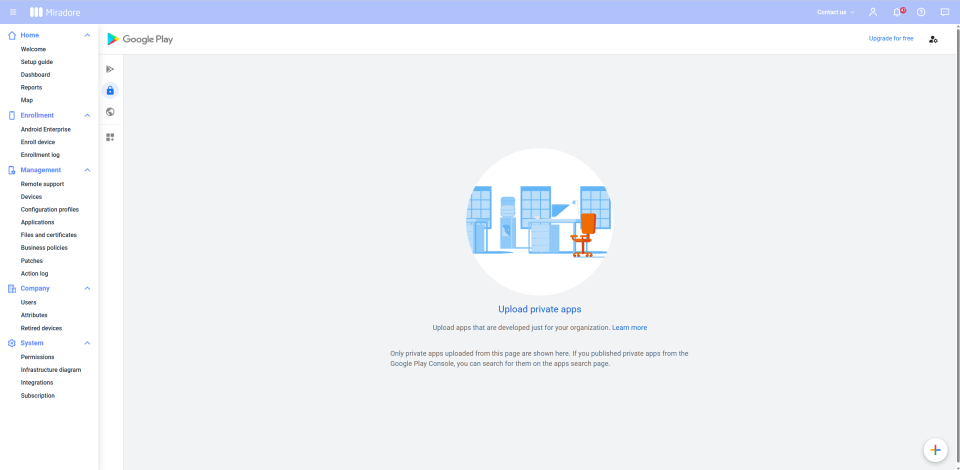
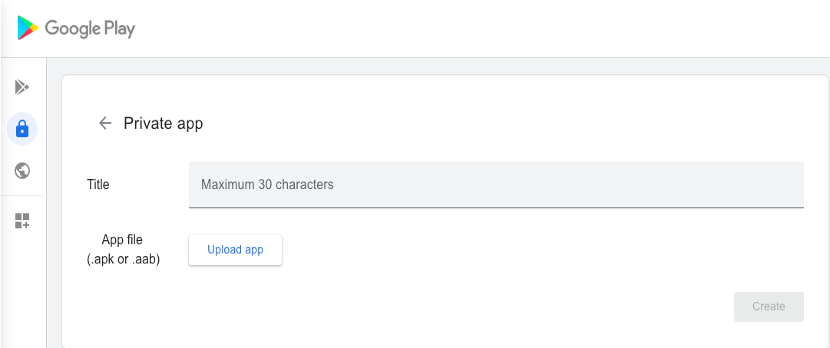
2) APK upload in Managed Google Play as a private internal app
Another option is to upload an AKP for your organization similar to a web app via the "Private App" item in Managed Google Play.
3) Release by the developer
Alternatively, the app can be released by the developer for individual companies via Managed Google Play for up to 20 companies.
iOS
There are two implementation options for non-public apps for iOS:
1) IPA distribution by Miradore
Miradore supports the distribution of IPA directly from the system. In contrast to Android apps, a certified Apple developer account was always required here (iOS Developer Enterprise Program).
2) Custom apps from Apple Business
Miradore also supports the distribution of custom apps from Apple Business. Developers can mark applications as custom apps via App Store Connect and upload apps assigned to the organization ID. This can be distributed to their end devices via VPP via Miradore, equivalent to public apps.


by Andreas Handler
Andreas works as a Senior Technical Consultant and Customer Success Manager at Miradore. He has been part of the Miradore family since 2016 and is passionate about providing value to organizations by showing them how to increase efficiency with Mobile Device Management. Outside of work, you might find him bouldering or playing volleyball.

