
Factory reset is the only way how users can remove management from fully managed Android devices.
Administrators can prevent device users from performing a factory reset on fully managed Android devices using a Miradore configuration profile. See the instructions below.
How to prevent users from factory resetting an Android device?
Before you start an important reminder to make sure that device users always remember their device's passcode. This is important because if the user forgets the device passcode, there is no way to reset, restore or keep using the device if the factory reset has been prevented with Miradore.
1. Go to Management > Configuration profiles on Miradore, and click Add from the page toolbar.
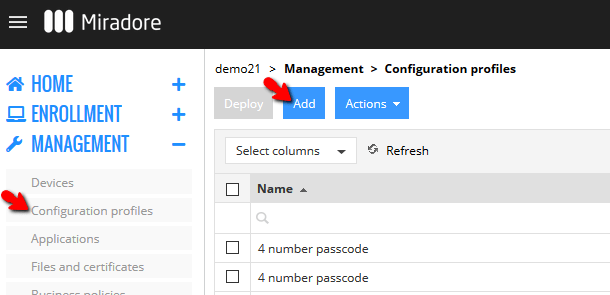
2. On the Configuration profile wizard, choose Android > Restrictions and then select Factory reset = Denied from the Device owner tab.

3. Complete the wizard as instructed, and then deploy the configuration profile to the devices. You can deploy the configuration profile manually from the Devices page using the Deploy button, or you can automate the deployment of the configuration profile using a Business policy.
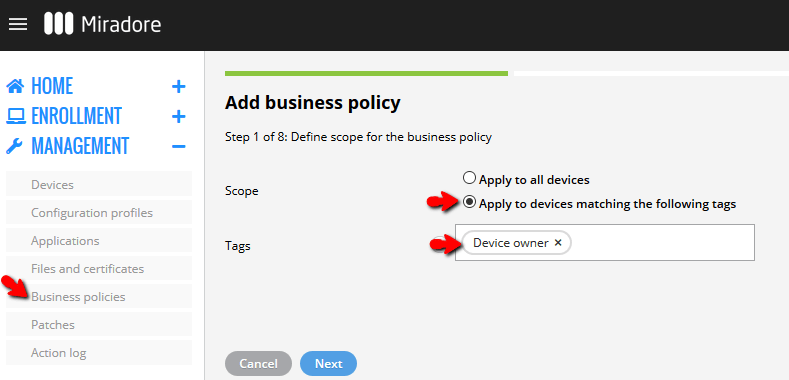
You can create new business policies on the Business policies page using the Add button from the page toolbar. When configuring the business policy, configure the policy scope so that it will be applied to all devices having the Device owner tag. This ensures that the configuration profile will be deployed to all Android devices that are managed in the fully managed device mode.
4. Choose the configuration profile that you created in steps 1-2 when you are asked to select the configuration profile on the business policy wizard.
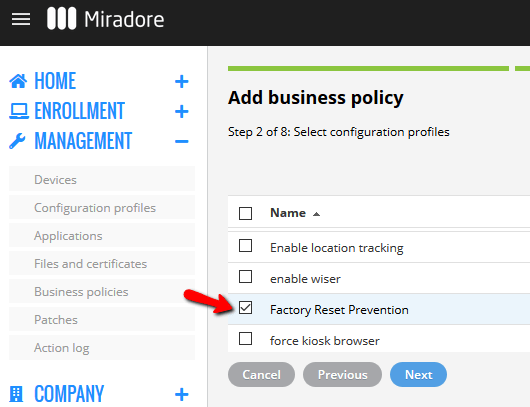
5. Complete the wizard. You can monitor the business policy by going to Management > Business policies page and opening your business policy with a double-click. On that page, you will see which devices have factory reset prevention in place.
Have feedback on this article? Please share it with us!
Previous Article:
« Always on VPN for Android
Next Article:
Preventing the removal of managed Google Play account »